Friday, March 1, 2013

Code Academy - Interesting Concept

Alex Viggio, my development lead at CU, sent me a link to the 2012 Crunchies Awards on Tech Crunch.  The winners were some of the usual suspects, but I saw a site that peaked my interest, CodeAcademy.com.  

Thier slogan is "Teaching to world to code." Now unlike a certain mayor, I don't believe everyone in the world can code.  It takes a 'different' mind than what everyone has.  I also don't believe everyone can paint, do carpentry, manage a team, fly a plane.  We're all different and we will find things beyond our abilities.  However, just because everyone won't be successful doesn't mean everyone shouldn't try.

I decided to take CodeAcademy for a spin.  It's important to me that people be taught to code in a responsible manner.  Bad habits develop early and lord knows I have my fair share.

The Profile
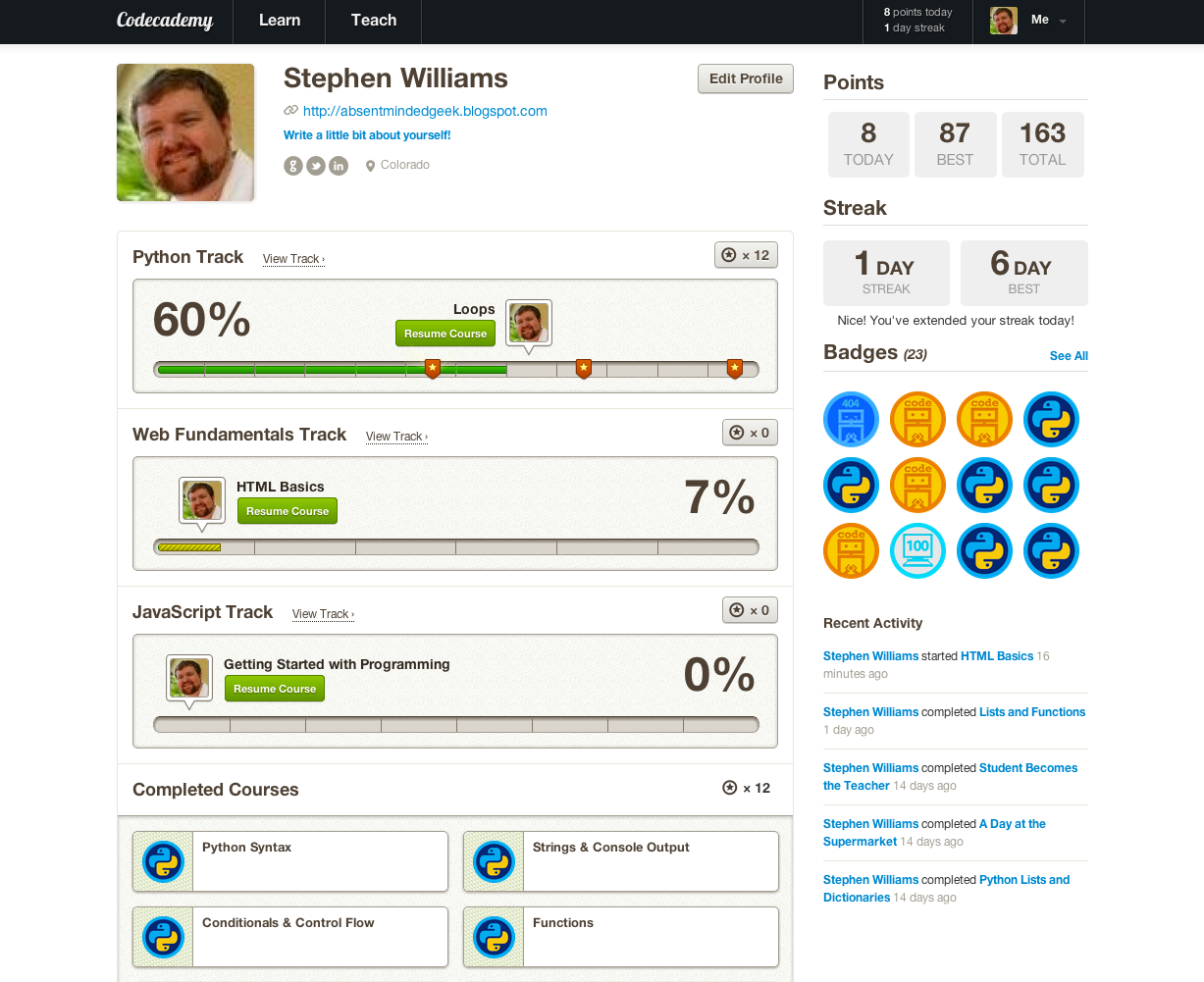
This is a requirement of almost any site, especially on the 2.0 web.  Unlike a lot of sites that attempt to integrate themselves with every known social site and application, CodeAcademy does a good job of selecting sites that represent developers
  • Github - as a developer if you haven't at least tried git and github then I believe you either have A) been living under a rock for the last few years or B) are my father and work on mainframes.  This is a great place to send new developers.  The first question I usually ask during a interview is "How do you share code?"  I then usually face-palm as they say, "thumb drive" or "email".
  • LinkedIn - lets face it facebook is for family and friends, LinkedIn is for co-workers and employers.  If you want to develop code professionally, you should have a LinkedIn account.
  • Twitter - I know several developers use it to point out interesting coding articles they find.  It's not as important as the first two, but it has been useful in the past.
They have taken a page out of gaming that I love in web 2.0 sites, badges.  You see them all over StackExchange, Ubuntu, Fitocracy, and others.  It's like merit badges for adults, giving a little 'props' for completing something.  It's also a nice way to measure yourself against your peers and see areas where you can explore.  Perhaps this is just turning us into a needy praise driven zombies, but that's a more cynical observation of the reward system.  I perfer to look at anything that motivates us as a positive.

The rest of your profile reflects you current progress.  It shows the tracks you are currently working on and the courses you've completed.  It's a nice portal into your history allowing you to return to where you last left off.

Courses

When you first enter the "Learn" side of the the codeacademy interface you'll see a variety of tracks.  Some are coding languages: Python, Javascript, Ruby.  Others are more applied: 'API's, Web Fundamentals, Projects.  I think this is a great start, I just wish that the system had more formal languages,  C, C++, Java, and even some data languages and syntax, SQL, XPath, SPARQL.  All of the languages they presented are dynamically typed languages and I assume have a lighter interpreter since they are evaluated at run time instead of compile time.

Python Course

The first track I started was the Python course.  I already know a bit of python from some google courses and my own messing around, but its not a language I use every day.  I figured a bit of a refresher wouldn't be bad and would help me gauge the course since it's the closest to a newbie that I could get.

The courses starts off slow, going over the basics pretty much in order of any standard language book or first year programming course.  Syntax, basic data structures, conditional statements, looping, advanced data structures; its all laid out.   There are a few courses in the middle which re-iterate things like looping and feel a bit redundant. However, it's a good over view of the language, with a bit of programming basics thrown in for those without computer science degrees.

An interesting element of the track is that each course in the python track is paired with a project.  The projects attempt to apply a scenario to the information you learned in the course.  Some of them are quite well done, and allow you to define everything.  Other's are quite rigid and basically offer a paint by numbers approach.

The only issue I found with this track is that's several sections are quite buggy and do not offer assistance about why you don't pass.  For example, the challenge "Exam Statistics", requires you to computer the variance of a set of grades.  In python it looks something like 

grades = [100, 100, 90, 40, 80, 100, 85, 70, 90, 65, 90, 85, 50.5]
def print_grades(grades):
    for grade in grades:
        print grade
def grades_sum(grades):
    total = 0
    for grade in grades:
        total += grade
    return total
 
def grades_average(grades):
    sum_of_grades = grades_sum(grades)
    average = sum_of_grades / len(grades)
    return average
def grades_variance(grades, average):
    variance = 0
    for grade in grades:
        variance += (grade-average)**2
    variance = variance/len(grades)
    return variance

Which computes the answer 334.071005917. This is correct when used in the next section.  However, the section tells indicates something is wrong, "Oops try again."  That's the frustrating thing about some courses in code academy.  The feedback and review on the course is determined by the administrator.  Where one course will say "Oh you didn't print the string but the array. Print the string instead" another will just say "Oops" and hope you understand enough about why you failed.  The "Oops" courses seem to have the most restrictive requirements for passing each section and so it only increases the frustration.

HTML Course

I started this course because it was something I knew very well.  The speed of the course was very slow for me, but probably the right pace for my mother.  Its slow, re-iterates itself, and goes through every major structure of a webpage.  Overall if you know the basics of HTML, skip this course, unless you are curious like I was.

Despite the slow and boring nature of the course, I did appreciate the design that went into building it's interface.  Unlike the Python course which had a run environment at the bottom and code at the top, the HTML courses had tabs for various files (such as the index and css files here) and a panel to the right which shows the result of the code on the page.  It has a fairly active autosave, but includes a submit button to force display and call the course evaluation procedures.  It was clean easy to follow along and work in the panels.

Conclusion

While coding isn't for everyone, CodeAcademy does make it accessible to anyone willing to try.  It's courses are well thought out, and it appears to be actively expanding.  You'll find a few bumps in the road with courses that are too restrictive in their completion criteria or not descriptive enough in the requirements to pass.  However, the forums and bug tracker are active and responsive so hopefully time will fix those courses. 

It's not a bad resource for active developers that haven't touched a language or area of development before.  It also has a "Teach" section that allows developers to give back to CodeAcademy and share their knowledge with the community.  

For my part, I may try my hand at the teach section. I'll also keep an eye out for any new courses or tracks.

I leave you with a little poem from the first section in Python (which is from the Python library)

Zen of Python
Beautiful is better than ugly.
Explicit is better than implicit.
Simple is better than complex.
Complex is better than complicated.
Flat is better than nested.
Sparse is better than dense.
Readability counts.
Special cases aren't special enough to break the rules.
Although practicality beats purity.
Errors should never pass silently.
Unless explicitly silenced.
In the face of ambiguity, refuse the temptation to guess.
There should be one-- and preferably only one --obvious way to do it.
Although that way may not be obvious at first unless you're Dutch.
Now is better than never.
Although never is often better than *right* now.
If the implementation is hard to explain, it's a bad idea.
If the implementation is easy to explain, it may be a good idea.
Namespaces are one honking great idea -- let's do more of those!

Appendix: Some sites about coding

  • codeacademy.com
  • code.org
  • codinghorror.com

Thursday, January 10, 2013

Three Tiered VIVO Build

An interesting aspect in the relationship between VIVO and Vitro (the non-ontology specific engine for VIVO and other projects) is the layered nature of the projects.  VIVO as a source repository is basically a shell that copies over it's Vitro base.

Cornell extends this further with adding their own changes to VIVO as a third level.  By modifying the build.xml file and the deploy.properties to include pointing at VIVO as a second layer, the build script can preform the same changes to VIVO as VIVO does to Vitro.

It seems a little complicated, but it removes you from the VIVO source allowing you to replace your VIVO target with the latest version and adapt more rapidly to new releases of VIVO.  There hasn't been a study yet, but I would guess that the average time from release of a new VIVO version to an institution upgrading to that version is probably around 5 months.  I know at UF it took us about that long (often waiting for the .1 release) and at CU they were still on 1.2 when I arrived (1.5 was released just before the VIVO conference in August).

I've started a wiki article on the new VIVO confluence wiki, https://wiki.duraspace.org/display/VIVO/Building+VIVO+in+3+tiers, that describes how to setup your local VIVO to run this three tier system.

Tuesday, January 8, 2013

VIVO Ingest in 1.5.1

Little update, about 3 months ago we moved from Gainesville, Florida to Boulder, Colorado as I accepted a position with the University of Colorado Boulder.  I'm back in the trenches, writing code everyday and working on VIVO for Faculty Affairs at CU Boulder.  Hopefully this will restart my attempts at writing more often and focus that writing on more technical and less managerial matters.

Updating Data Through Data Ingest in VIVO 1.5.1

I've had a lot of tasks at CU since starting, and I'll go over some of the things I've learned and written soon enough.  For now I wanted to talk about updating your Data in VIVO 1.5.1.  In the old days, when four programmers at UF embarked on Data Ingest, if you wanted to get data into VIVO you had to add it to the systems "Main Model" known as KB2.  This made data ingest difficult during the update phase because you either had to 
  1. Start over from scratch with a blank VIVO
  2. remove the previous data that you ingested which contained the data you want to change
Semantic Triple Stores, didn't have a key that we could use to link a row in KB2 to the data coming in from our source (in hindsight I believe there are ways with hash keys that we should have probably done this).   Due to this we constructed a very complicated (and time expensive) process to compare the data you are putting into VIVO against the last time you ingest from that source.  It creates an additions and a subtractions file which you then apply against the KB2 model.  Basically it was a bit like writing a remove and insert to accomplish an update in SQL.

Now in VIVO 1.5.1 this is mostly the same.  However, data doesn't have to be in the main model to be index.  So now we can separate our data by the source, or in the case of CU the tables that generated the data.  This allows for a shorter ingest process, we're only interested in dropping and adding to the models that have changes to be made.  I took CU's current process (which uses selenium scripts against the UI) and ripped out the portion that loaded data into KB2 (download of the data, use add/remove screen to load the exported data to the main graph) and I added a method to drop the import graph that we used.  This dropped my time from 3-4 hours to 1 hour for an entire ingest.

We were still rebuilding from scratch with each ingest and now that we're heading to production I wanted to make this process a little faster.  So I wrote the first of a couple of scripts towards automating the entire process.  This first script reviews the dat files for changes, allowing me to drop only the graphs that have changes and re-run thier ingest scripts.  

The process was fairly simply and I've included a couple of sites and blogs I used to figure out what to do.  By hand (which will become another script soon) I copied down the data from the previous run and ran a new export and copied down the new data.  I then pass to my new little script the two paths for the old data and the new data.  

The first step in the script is to review all of the file names and see what is missing, what's new.  Since the export process is an sql script which always uses the same file names for each of it's methods we don't have to worry misspellings, just new dat files or the lost of a dat file.
def reviewFolderForChanges(oldFilePath, newFilePath):
    #read in file path
    oldFiles = os.listdir(oldFilePath)
    newFiles = os.listdir(newFilePath)
    
    #get names of files in order of name by create list
    for newFile in newFiles:
        if newFile in oldFiles:
            reviewFileForChanges(oldFilePath+newFile, newFilePath+newFile)
        else:
            print "New File Found: " + newFile
            
    for oldFile in oldFiles:
        if oldFile not in newFiles:
            print "File Missing: " + oldFile 
 The next and final step in the process was to review the files themselves.  I could have used the python difflib, but I wanted more information from the files.  I wanted to know what was new and what had been removed.  Plus I found a nice little reference post by a Frankie Bagnardi that I wanted to implement myself.  The result has greatly increased the ability of the ingest operator (me today, probably alex and vance at other times) to make sure that the changes coming in are reflected in VIVO.  For example


Changes in file:/Users/stwi5210/Source/uccs-new-data/fis_faculty_member_positions.dat
- "http://vivo.uccs.edu/fisid_XXXXX","http://vivo.uccs.edu/deptid_XXXX","1435","Chair","http://vivoweb.org/ontology/core#FacultyAdministrativePosition","2","2"
- "http://vivo.uccs.edu/fisid_XXXXX","http://vivo.uccs.edu/deptid_XXXX","1419","Lecturer","http://vivoweb.org/ontology/core#FacultyPosition","5","4"


With information like this I go to the two individuals listed and make sure that they no longer have the positions of Chair or Lecturer.  This let me know that my ingest was successful and to report that it's ready to migrate to production.

All in all the script took about an hour to construct and then run and saved me about 40 minutes of ingesting.  Plus I was able to review VIVO after the ingests were finished for the data that should have changed, which is a big improvement over our previous methods of review.

Citation(s):

  • Compare Two Files with Python by Frankie Bagnardi- http://aboutscript.com/blog/posts/107
  • Python: iterate (and read) all files in a directory (folder) by Bogdon T - http://bogdan.org.ua/2007/08/12/python-iterate-and-read-all-files-in-a-directory-folder.html

Wednesday, March 7, 2012

Ubuntu Global Jam - Lessons I Learned

Ubuntu Cupcakes from Stacy Skaggs
The Ubuntu Global Jam was last Friday through Sunday and on Friday some Florida LoCo members got together at Chris Johnston's house in Orlando.  I've never been so I thought I would go, though it was on a Friday I could use the break.

I learned quite a few little things to make life easier working on Ubuntu Websites.  The first is a way of keeping the same development environments across project branches.  This has always been an issue for me because with bzr you can't just bzr checkout branch-name and the code changes like git.  Thats not its workflow.  Michael Hall pointed me to this post which is the method he uses for all his bzr repositories.  Basically, create a blank repository.  Inside the repository you create a trunk with the code from launchpad.  Then you branch the local copy into your feature/bug/issue branch.  Finally you lightweight checkout that branch to a working repo folder.  Sound confusing?  It does at first.  First off lightweight checkout doesn't import the code, just links to it.  Meaning when you modify code, push code, commit code its happening from the named branch not from work.  When you create your development environment around work, those files reference the work directory.  So when you change to a different feature, bug or issue the environment files still point to work and you don't have to rebuild.  Example commands:

bzr init-repo project-name
cd project-name
bzr branch lp:launchpad-bzr-name trunk
bzr branch trunk issue-specific-name
bzr checkout --lightweight issue-specific-name work

The second thing I learned was virtualenv for python.

sudo apt-get install python-virtualenv 
sudo apt-get install virtualenvwrapper


These separate the required environment for the ubuntu community websites from the installation of python you have installed and keeps everything nice and clean.  Now little did I know I was using this sort of with the make commands, however, with knowledge comes control and understanding.

I also got to see a bit of python dbugging as Michael Hall and Chris Johnston worked on that for a bit. Ate some fantastic cupcakes, and had a great time getting to dedicate some time to Ubuntu with some pretty awesome people.

Wednesday, February 29, 2012

Whose to blame for the misunderstanding ...

The incident I refer to is one happening more and more at work (and not just for me).  Examine the scenario:

A junior engineer has been given a feature to develop.  A senior engineer has built the basic mockup of the page, hooked it into the framework, but as the engineer attempts he runs into issues.  He asks, through email, how do I save to the database.  Its a project from a different development group, but the senior engineer has been through their code so he suggest looking into one part of the site and view specific controller and view files.  The junior engineer acknowledged and life moves on.  A week later the junior engineer comes to the senior engineer and says he is still having issues, so they open his code.  The junior engineer has created a new file (instead of following editing the files already apart of the application structure) and is attempting to drive logic that belongs in the controller in a file in the view.  He has ignored the structure of the site and is basically fighting against the natural flow of the program.  At first glance I'd say this is a lack of understanding of MVC.  However, this is not the first MVC project for this junior engineer.

Its a story playing itself over and over again in different ways.  At first glance, I'd assume the engineer never looked at the example files and project flow, instead they just looked up "PHP connect to database".  His code suggest that perhaps he looked at it, but didn't understand how the application uses the files.  Perhaps the senior engineer should have called the junior engineer over and shown them the files and explained the various methods in play to save and how they work with the view.

A friend of mine once mentioned a similar issue with contractors in the corporate landscape.  When he worked with them, over time he found himself practically programming the feature in the documentation to get the functionality he needed.  Inevitably they fought the existing application and built extraneous files.  At one point thier source had 4 different time classes that returned the time.

So how do we fix this without resorting to writing the program on a piece of paper and turning our junior engineers into a programming steno pool?  Is this a hiring issue, should we let junior engineers like this go?  A communication issue, did we not explain the solution completely should we have diagrammed it out?  A language barrier?  A training problem?  An experience issue?

At this time ... I'm lost, perhaps time will bring insight.

Friday, January 20, 2012

Passion Breeds Collaboration While Lack of it Breeds Indifference

I'll put the user in a box
Ever go to the doctor's office full of questions and ideas about a long term illness you may have?  Perhaps that's only me.

How did the doctor act?  Did he engage you in conversation?  Did he seem to ignore you?  Did he dismiss your questions?  Did he answer everything you asked and perhaps ask some of his own?

Have you ever been apart of an open source project?  On a mail list with other eager users and developers?  How did you react the last time someone sent in a question or suggestion?  Did you give them feedback?  Did you bypass the email based on subject?  Did you request more from them, perhaps code or testing?  Did you taunt them with your superior knowledge?

A friend of mine and I were talking about doctors and we came to the conclusion that the best doctors were the ones that wanted your input on your care.  It felt like it was because they were passionate about their jobs.  It seemed to us that the doctors who weren't either had lost the spark, or were only interested in medicine for the prestige, money, or perhaps family history (my father and his father and his father's father, etc).  That somehow led us to talking about open source projects and our time on one.  I came to realize that my passion for the project and for my career affected my involvement with the project.

When I was a developer I loved to hear from everyone.  I read every email, I was always on IRC.  As I moved into a manager role I became more remote.  I was hardly on IRC, I usually ignored listserv email.  Tickets from users were no longer wonderful feedback but annoying things that they could have fixed themselves.  My attitude dropped as I moved from that which I'm passionate about to something that I'm not.  So, I've stopped managing that project and tried to go back to engaging and coding.  The passion, its coming back, a bit slowly but only time will tell.

So the moral of this story?  When you are dealing with some a-hole professional don't be quick to judge.  Perhaps he made a wrong turn and is in a position that he has no passion for.  Instead of cursing him, say a little pray hoping he'll find his way to a profession he is passionate about. 

Monday, January 9, 2012

Engineer, Developer, Programmer, Analyst ... pick one?

I remember a while back my old boss mentioning he had chosen the working title of "Software Engineer" for positions at work because Engineers are not "web masters".  When I started this article I had been looking at positions on-line and I noticed a mix of definitions for the same work: Programmers, Software Developer, Software Engineer, Analyst.

From Dictonary.com
  • Software Engineer - a person who designs and writes and tests computer programs 
  • Software Developer - No Definition
  • Analyst - a person who analyzes 
  • Programmer - a person who writes computer programs.
Researching this post has lead me to the following conclusion.  A Software Engineer and a Software Developer are modern terminology for Analysts and a Programmers as Software as a field gets older and understands itself better.

Long ago we compartmentalized the field.  Analysts analyzed the needs of the customer and came up with the design then handed it off to programmers who actually created the application.  As the field has matured we learned a little bit about ourselves, we all like to design but secretly need to create too.  Software Engineers and Developers have come to embody a unified process of design, development, and implementation.  As you go up the technical ladder you design and mentor more than you write and test, but those things do not go away absolutely.

What is the difference between engineers and developers?  At first glance an engineer is a highly exact individual from a school of engineering.  However, in reality the difference is field of work.  Web companies, business groups, and application centered hardware agnostic positions tend to be described as Software Developers.  Technology companies and hardware centered positions tend to be described as Software Engineers.  As members of the software field both have to design the application to the users specification, write the application, and develop tests of that system.  Its the nature of the field.